
Purple Exhibits · Event facts verified August 24, 2026

A live demonstration can do what a wall graphic cannot.
It can turn a complicated technical claim into visible proof.
It can also fail because of something painfully small: one missing adapter, an unapproved network port, a screen set to the wrong resolution, a laptop update, an overloaded circuit, or a product that cannot be reached after it is mounted.
A reliable SATShow technical demo booth is not a monitor attached to a wall. It is a coordinated system involving the product, booth structure, power, internet, AV, content, cabling, security, staffing, and a tested backup plan.
Purple Exhibits designs and delivers technical trade show environments for companies that need more than attractive architecture. Depending on the approved scope, we can coordinate the booth structure, custom product fixtures, AV, utility planning, shipping, installation, testing, and show-floor execution so your team can focus on the demonstration and the people watching it.
Your technology should be the story—not the troubleshooting.
Plan Your SATShow Technical-Demo Exhibit
The short answer: Freeze the equipment specifications, signal path, utility requirements, and failure plan before booth engineering is complete. Test the actual hardware and final content before shipping. Use the appropriate ordered venue services. Bring an offline demonstration or recorded fallback. If one live connection supports your entire story, the demonstration is not ready.
In This Guide
- Technical demo brief
- 100-point demo readiness score
- Equipment integration
- Electrical power
- Internet planning
- Backup demonstrations
- Worked Demo Control Plan
- Four demo dependency classes
- System testing
- No-Silent-Changes Protocol
- Purple field notes
- Final checklist
- Frequently asked questions
Why Technical Demonstrations Matter at SATShow Week 2027
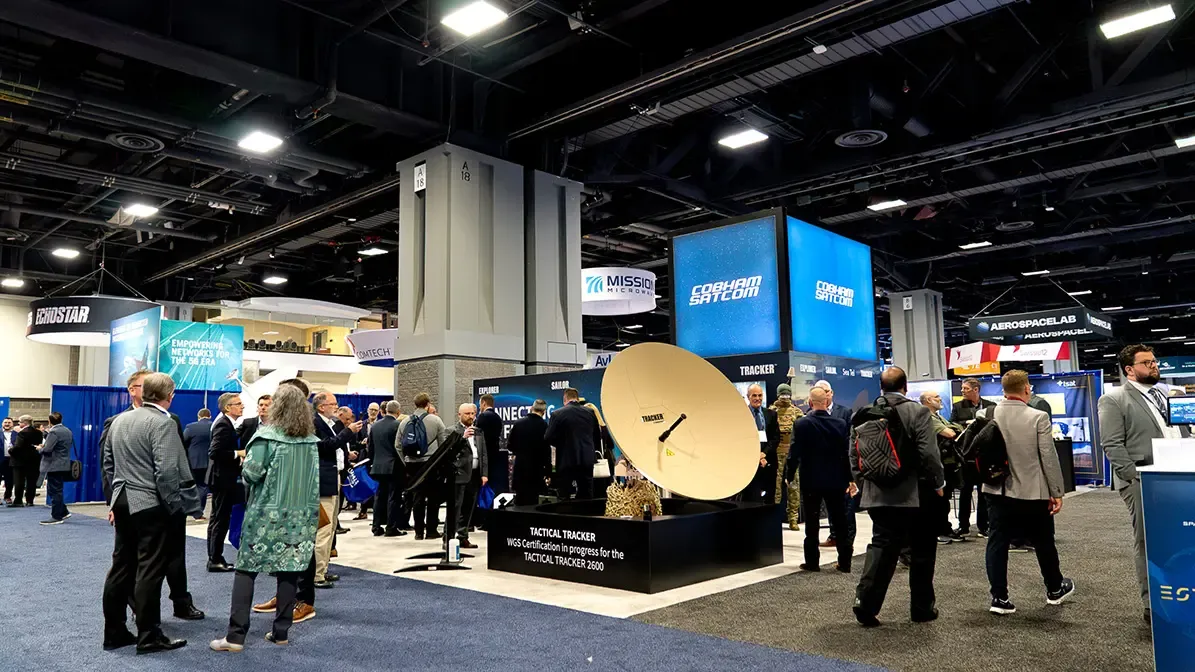
SATShow Week 2027 runs March 8–11, 2027, with the exhibition open March 9–11 at the Walter E. Washington Convention Center in Washington, D.C. The official exhibition overview lists 450+ global vendors, 40+ product categories, and attendees from 110+ countries. The 2027 exhibitor prospectus lists 15,000+ attendees and reports that, among 2026 attendees, 82% had purchasing power and 98% visited the exhibit hall. It also reports that the 2026 mobile app facilitated 900+ face-to-face meetings and 4,686 messages.
SATELLITE and GovMilSpace visitors include engineers, operators, manufacturers, integrators, buyers, government and military stakeholders, investors, and executives. For antennas, terminals, ground systems, remote sensing, RF components, software, cybersecurity, IoT, and connectivity products, a working demonstration can become the shortest path from a technical claim to a serious conversation.
The official SATShow Week 2027 registration page identifies systems engineers, RF engineers, security architects, and R&D leaders as the Tech Seminar audience, while the Exhibit Hall Pass is positioned for technology buyers, vendor evaluators, connectivity decision-makers, and procurement teams. That audience is prepared to compare architectures—not only admire screens. Design every demonstration so the operator can identify the system boundary, explain what is live versus simulated, show the proof clearly, and route a detailed question to the right engineer.
Start With a Technical Demo Brief—Not a Rendering
The booth cannot support information it never received.
Before the final SATShow booth design is approved, create one technical brief for every demonstration. The exhibit builder, client engineering team, AV team, content team, and on-site operator should all work from the same information.
Technical input sheet
Do not estimate dimensions from a product photo. Do not assume every device uses a standard outlet. Do not write “internet required” without defining what the demonstration actually needs.
The more technical the product, the more specific the brief should be.
Use Purple’s 100-Point SATShow Technical Demo Readiness Score
Purple developed this score as a practical preflight tool—not as an industry standard or a guarantee. Score each category 0 if it is missing, 5 if it is defined but not fully tested, and 10 only when it is tested, documented, and assigned to an owner. Use an intermediate score only when the evidence genuinely falls between those stages.
Interpret the total this way:
- 90–100 — Show-ready: Evidence exists across the complete system. Finish the daily check and protect the approved configuration.
- 75–89 — Strong, with gaps to close: Assign every missing owner and test every incomplete dependency before shipping.
- 50–74 — High-risk: The demonstration may work, but too much still depends on assumptions or a single failure point.
- Below 50 — Not ready for shipment: Stop adding polish and close the technical fundamentals first.
A high total never cancels a critical zero. Resolve and retest every zero before shipping the demonstration system.
The score is intentionally demanding. A beautiful rendering earns zero points for an untested signal path.
Design the Physical Station Around the Real Equipment
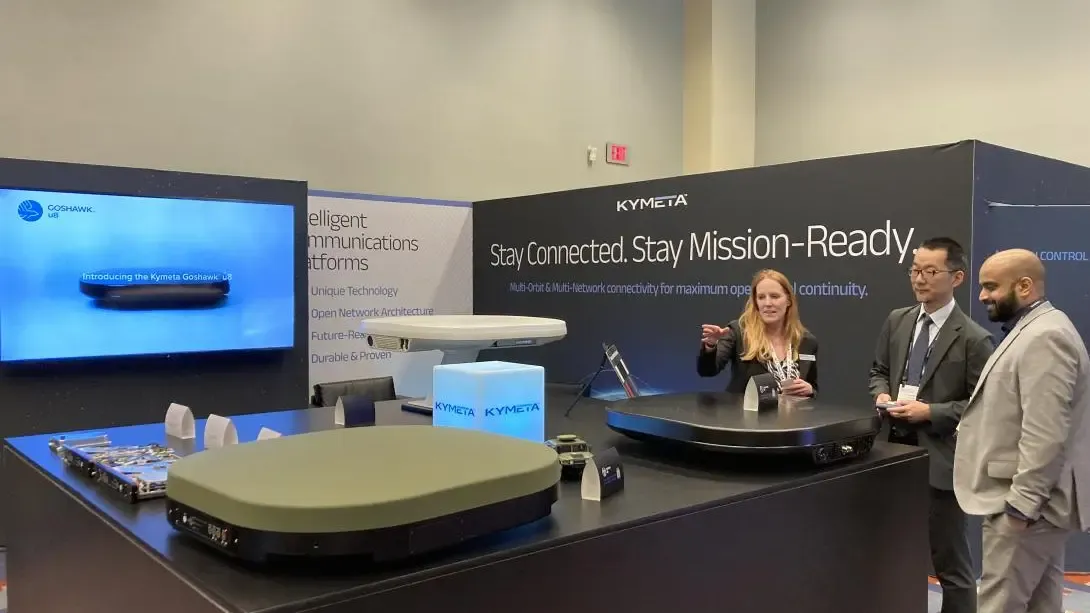
A product demonstration station must work for the product, the presenter, and the visitor at the same time.
Product Mounting and Service Access
The mount or counter should be engineered around the actual product dimensions and weight. The design must also provide access to power buttons, connectors, removable panels, ventilation openings, and anything the operator may need to reset during the show.
Ask:
- Can the equipment be installed without damaging it?
- Can the operator reach every required connection?
- Can a failed cable or media player be replaced after the booth is finished?
- Does the product require reinforcement, leveling, vibration control, or a custom base?
- Can the product be removed quickly at show close?
- Will the equipment travel in its own crate or with the exhibit?
“It fits” is not the same as “it can be operated.”
Cable Routing
Every cable needs a deliberate path from source to destination. That may mean access through a counter, raceway, raised floor, structural frame, wall cavity, or floor port.
Power and data should be planned together but routed and installed according to the applicable electrical, fire, venue, and show rules. Cables should not cross a visitor path, hang visibly from the back of a screen, or become impossible to reach once graphics are installed.
Create a labeled cable schedule before the booth ships. Label both ends of every critical cable. Pack tested spares for the connections most likely to fail.
Heat and Ventilation
Computers, processors, network hardware, amplifiers, chargers, and LED equipment generate heat. A closed cabinet can trap that heat even when the exhibit hall feels comfortable.
Ventilation should be part of the fabrication plan. Confirm intake, exhaust, clearances, fan noise, service access, and whether the equipment manufacturer restricts how the device may be enclosed.
The best-looking cabinet in the hall is still a bad cabinet if it shuts down the product inside it.
Plan SATShow Booth Power From a Device Load List
SATShow booth power requirements should begin with a device-by-device load list—not a rough guess based on booth size.
Include:
- Demonstration hardware
- Computers and workstations
- Monitors and touchscreens
- LED displays and processors
- Media players and switchers
- Network equipment
- Chargers and accessory devices
- Product lighting
- Counter and architectural lighting
- Any equipment used only during startup or calibration
For each device, document the manufacturer’s electrical requirements and plug type. Identify equipment that must operate continuously, equipment that may draw more power at startup, and equipment that should not share a circuit with lighting or hospitality appliances.
The electrical plan should show every drop, outlet, connection point, and intended device. The booth builder should coordinate the physical locations with the structure; the designated electrical provider performs the work controlled by the venue or show.
The current Events DC service-partner page links a Hi-Tech Electric FAQ instructing exhibitors to calculate power from the amperage or wattage of every powered device—including lighting—and to show the load at each requested outlet location on a scaled booth plan. The FAQ also treats 24-hour power as a separate order. Use that guidance to prepare the load plan, but confirm SATShow 2027 service categories, labor, deadlines, and rates in the final official forms.
Where appropriate and permitted, discuss approved power conditioning or backup power with the technical team and official provider. Never bring or connect unapproved distribution equipment based on an assumption from another show.
Treat SATShow Booth Internet as Part of the Product
If the demonstration depends on a remote server, cloud application, live network, video call, real-time data feed, license validation, or VPN, the internet connection is part of the demonstration—not a convenience.
Events DC lists complimentary basic wireless access in designated seating areas. Do not assume that service will reach your booth or support a mission-critical demonstration.
Questions to Answer Before Ordering Service
- Does the demo require a hardwired connection?
- What upload and download performance does it need?
- How many devices will connect simultaneously?
- Does it require a public or fixed IP address?
- Will a VPN, firewall, security policy, or port restriction affect access?
- Does the company IT team need to whitelist the venue connection?
- Can the software authenticate from a new location?
- Will remote administrators be available during move-in?
- What happens if the live server is unavailable?
Events DC currently identifies Smart City as the Walter E. Washington Convention Center’s exclusive telecommunications and internet provider. Order instructions, available services, deadlines, and rates should be confirmed through the official SATShow 2027 Exhibitor Resource Center and final Exhibitor Services Manual.
The safest plan is simple: order the connection the demonstration requires, test it during move-in, and still prepare an offline path.
Build Three Versions of the Demonstration
A strong technical-demo plan does not ask whether the live version will fail. It asks what the visitor will see if any dependency becomes unavailable.
The fallback should not feel like an apology.
It should tell the same story, use the same key proof points, and end with the same next step. Staff should know how to move between modes without announcing a technical emergency to the entire aisle.
Store final media locally on more than one approved device. Turn off automatic operating-system updates, sleep settings, pop-ups, and notifications where company policy permits. Confirm that every file opens without internet access.
Redundancy is not extra equipment. It is opening-day insurance.
The Purple Demo Control Plan: A Worked SATShow Satellite-Terminal Example
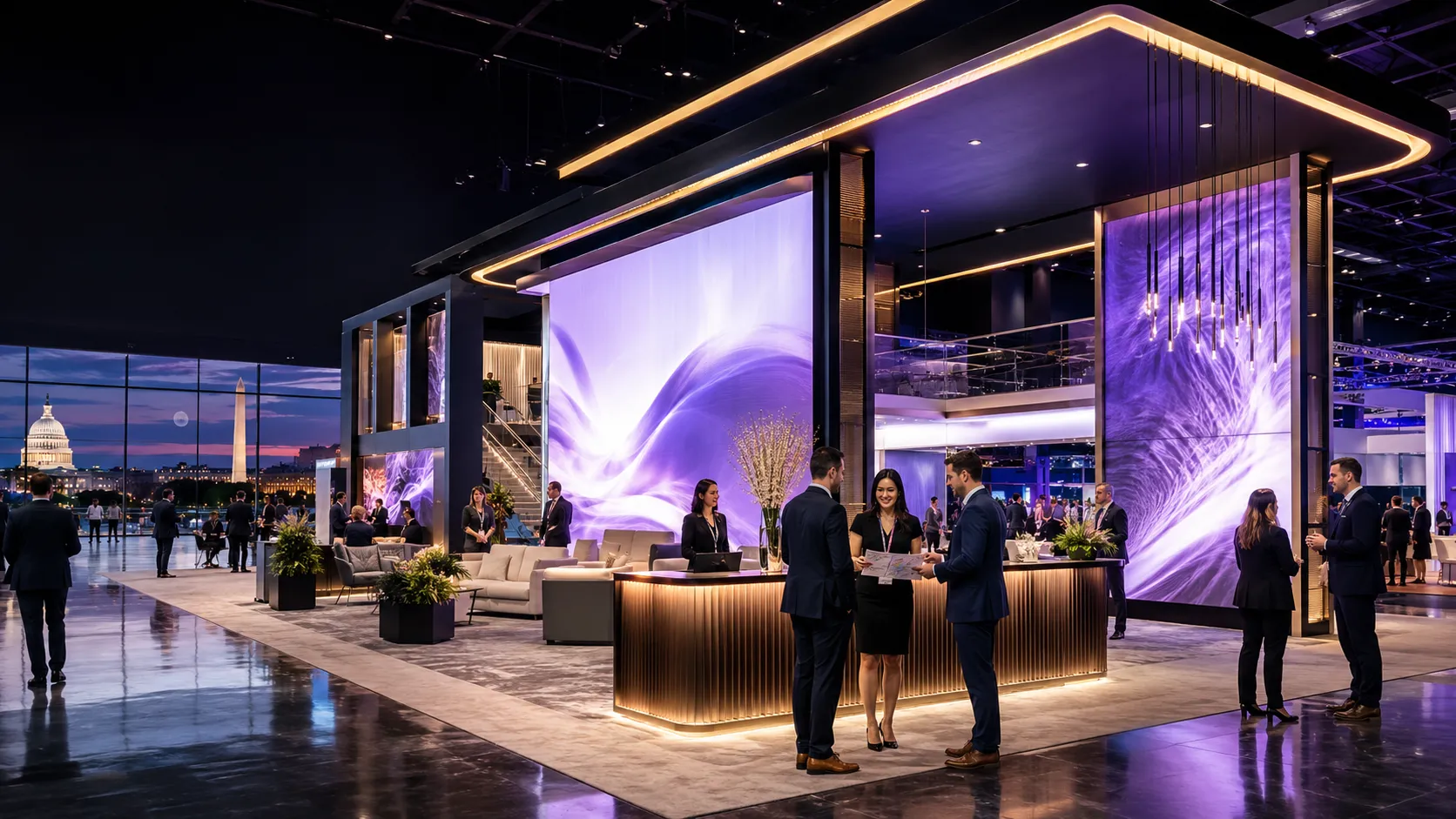
A rendering can show where a screen belongs. It cannot show what happens between the product, power, network, software, presenter, visitor, and backup system.
Purple calls the document connecting those dependencies the Demo Control Plan. It turns the technical brief into one operating plan that the exhibitor, exhibit builder, AV team, designated venue providers, product engineers, and show-floor staff can follow.
The example below is illustrative—not a SATShow rule, an actual client configuration, or permission to transmit RF.
Scenario: An exhibitor wants to demonstrate a satellite terminal and cloud-based management platform. A presenter operates the interface from a laptop, a shared display makes the result visible from the viewing zone, and qualified visitors move into a technical conversation. The live platform is the preferred proof, but the sales story cannot stop if a connection, login, or device fails.
Give One Proof Three Useful Depths
The official SATShow exhibition overview highlights advance meeting scheduling, and the 2027 prospectus describes searchable exhibitor profiles and meetings at the booth. Build the demonstration for both walk-up discovery and scheduled technical conversations.
Purple’s 30/3/15 Demo Ladder is a planning method—not a show rule:
The official 2027 exhibition overview also announces guided, hop-on/hop-off exhibit-hall tours grouped by product category; schedules and registration details remain to be announced. A tour does not guarantee a stop at any booth, but it creates a useful burst-traffic test: can one operator run the 30-second proof, a second answer technical questions, and a third route qualified visitors into appointments without blocking the aisle? Rehearse that mode, keep the demonstration resettable, and do not advertise tour participation unless SATShow confirms it.
Publish the scheduled demonstration times, product category, audience, and appointment instructions in the exhibitor profile when the available official tools support them. Do not advertise a cadence the booth team cannot operate consistently.
If the technical story needs more time than the booth can give it, split the job. The official 2027 Exhibitor & Sponsor Prospectus describes 30-minute Partner Sessions in event theaters. Use the booth for the fast proof, a confirmed Partner Session for the deeper public explanation, and a booth appointment or Meeting Hub conversation for focused follow-up. Session availability, package terms, location, production support, and scheduling must be confirmed with SATShow; this is an audience-routing option, not a show rule or an included exhibitor benefit.
Map the Complete Demonstration—Not Only the Screen
Primary operating chain Physical terminal → demo interface → ordered wired internet → approved VPN or cloud environment → presentation laptop → tested AV interface → shared display → visitor conversation
Local recovery chain Simulated terminal data → local sandbox or cached dataset → same presentation interface → shared display
Recorded failsafe Short locally stored walkthrough → independent playback device → shared display
If the product transmits RF, creates a hotspot, uses unusual power, or connects to a controlled system, the exhibitor must confirm permission, security, and operating requirements with the appropriate internal teams, show management, venue, and final 2027 Exhibitor Services Manual.
The Seven Documents That Make the Plan Executable
The finished Purple Demo Control Plan should connect:
- The one-sentence demonstration promise and visitor next step
- The approved equipment list and product-integration detail
- The device load list and electrical-location plan
- The network-requirements sheet for the exhibitor’s IT team and official provider
- The complete source-to-screen signal diagram
- The primary, local, and recorded failure-recovery matrix
- The receiving, installation, testing, startup, reset, shutdown, and escalation runbook
These documents should agree with one another. If the network sheet changes, the test plan must change. If the product model changes, the fixture, power plan, ventilation, shipping plan, and installation sequence may also change.
That is the difference between adding technology to a booth and engineering a booth around the technology.
One demo. One control plan. No missing middle.
Build Your SATShow Demo Control Plan With Purple
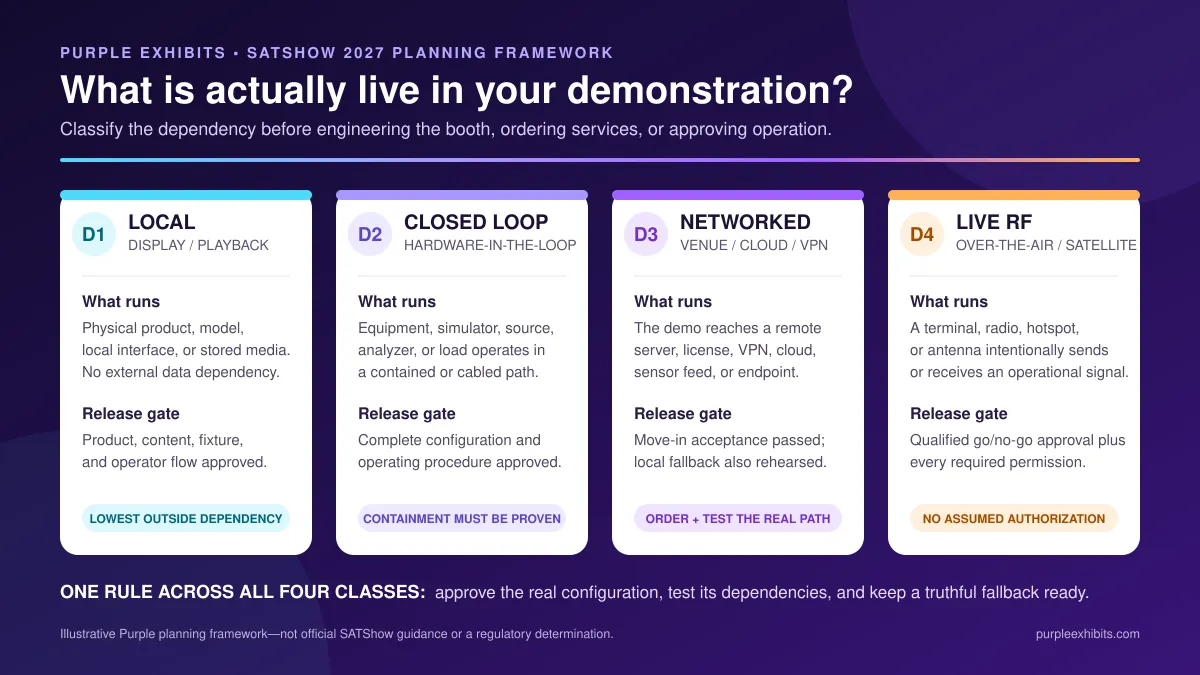
Decide Whether the SATShow Demo Is Local, Closed-Loop, Networked, or Live RF
“Live demonstration” is a marketing description. It is not a technical specification.
At SATShow, a “live” exhibit may range from local playback to hardware-in-the-loop testing, a cloud-connected platform, or an intentional RF link. Those setups can look similar to visitors but create very different service, testing, safety, approval, and fallback requirements.
Classify every demonstration before booth engineering begins.
Purple’s four classes below are a planning method—not an official SATShow standard, regulatory determination, or substitute for qualified technical and legal review.
Events DC identifies Smart City as the Walter E. Washington Convention Center’s exclusive technology and internet provider. Complimentary venue Wi-Fi is listed for designated seating areas—not as a booth service for a mission-critical demonstration. A networked demonstration should therefore be designed around the ordered service location and final provider requirements, not merely a note that says “internet needed.”
Match the Demo Station to the Technology
Different satellite and space products create different physical and technical requirements.
Apply the D1–D4 release gate above to any transmitting, unusual-power, battery, heat, or other special condition.
Integrate SATShow Booth AV Into the Explanation
SATShow booth AV should make complex technology easier to understand. It should not become a giant moving distraction.
Choose the Screen Around the Viewing Experience
Consider:
- Intended viewing distance
- Number of simultaneous viewers
- Fine technical detail versus large visual storytelling
- Screen size, resolution, brightness, and orientation
- Touch interaction versus presenter-controlled playback
- Glare and sightlines from the aisle
- Mounting height and accessible controls
- Heat, ventilation, and service access
- Content resolution and aspect ratio
A small technical interface may be appropriate on a close touchscreen while a larger monitor shows the system outcome to the surrounding group. An LED wall may be valuable for big visual stories, launches, and high-capacity presentations, but it should not force a detailed software interface into a format visitors cannot read.
Purple can coordinate trade show AV service and LED trade show displays as part of the booth plan, including screen integration, playback hardware, cabling, content specifications, setup, and testing.
Events DC currently lists Projection Presentation Technology as the venue’s audio/visual service partner. Confirm any building-infrastructure, labor, or provider requirements through the final SATShow 2027 Exhibitor Services Manual before ordering or connecting booth AV.
Control Audio Before It Controls the Booth
If the demo uses sound, design for the actual show-floor environment. Directional speakers, headsets, captions, or a smaller controlled presentation zone may communicate more effectively than turning up the volume.
Events DC’s current exhibitor policies state that booth sound may not exceed 55 dB unless specifically approved. The final SATShow 2027 rules will control, and nearby exhibitors should never become unwilling participants in your presentation.
Keep Demonstrations and Meetings From Competing
SATShow is a meeting-driven event, so the demonstration and conversation areas must work at the same time. Keep the viewing zone out of the aisle and away from the meeting-room entrance, separate presentation audio from focused discussions, and create a natural handoff from the demo to an open, semi-private, or enclosed conversation area.
A private booth room can reduce distractions. It is not a secure facility and should never be presented as a location for classified or otherwise controlled conversations.
For broader footprint, budget, timeline, and builder-selection guidance, use Purple’s complete SATShow 2027 exhibit booth planning guide.
Assign Every Technical Responsibility
Many show-floor failures happen in the space between vendors: everyone assumed someone else owned the final connection.
Build one responsibility-and-scope matrix before production. It should name the owner, the included work, the evidence required for release, and any exclusions.
The exact owner can change. Unclear ownership cannot. The proposal should list equipment, quantities, responsibilities, testing, support level, exclusions, and who can approve a change; “AV included” is not a technical scope.
Depending on the approved scope, Purple Exhibits can coordinate the physical booth and the technology inside it through one exhibit program. That connects the screen location to the structure, the cable path to the counter, the product mount to the real equipment, and the show-service plan to the final layout.
One team. One technical plan. Fewer places for critical details to disappear.
Request a SATShow Technical-Demo Booth Proposal
Test the Complete System Before It Ships
Testing a monitor by itself is not the same as testing the demonstration.
The strongest pre-show test uses the actual product, computer, content, screen, processor, adapters, network assumptions, mounting method, and operating sequence.
SATShow Technical-Demo Test Matrix
Do not schedule the first complete test for the night before the exhibition opens.
Lock the Show Configuration: Purple’s No-Silent-Changes Protocol
A full-system rehearsal proves only the configuration that was actually tested.
Change the laptop, firmware, product model, mounting hardware, power supply, VPN, account, media file, adapter, screen, or cable after that test and part of the evidence may no longer apply. Late changes are sometimes necessary. Undocumented changes are optional.
Purple’s No-Silent-Changes Protocol keeps one project-approved configuration between the final rehearsal and show close. It is a planning method—not a SATShow requirement or a substitute for the exhibitor’s engineering, safety, security, RF, or compliance authority.
Put Every Change Through the Seven-Path Gate
Classify the Change Before Anyone Says “It Should Be Fine”
For every change, record the old state, new state, reason, requester, affected paths, required retests, document updates, approver, and release time. If the team cannot complete the gate, roll back to the last approved configuration or operate the prepared fallback.
A “Simple” Laptop Replacement Is Not One Change
Suppose the approved presentation laptop is replaced after the shop rehearsal. The new device may have a different charger load, video output, resolution, HDCP behavior, adapter, sleep policy, security profile, VPN certificate, software license, local media library, and administrator access.
Treat it as a connected change. Load the approved show image, confirm credentials without exposing them, test the ordered-network path, disconnect the network and run the local mode, play the recorded failsafe, verify the exact adapter and display resolution, run the reset, update the packing list, and have the named owner release the device. Keep the previous approved laptop available when practical.
Late changes happen. Silent changes are optional.
Field Notes From Purple Technical Exhibit Builds
Purple’s published project work shows why technical exhibits cannot be designed from one template:
- For Pixee Medical, a large-screen demonstration counter supported recurring live augmented-reality presentations, with a glass meeting room positioned for the handoff into deeper technical conversations.
- For KLEEMANN, touchscreen stations, VR demonstrations, smart-control content, and physical products were arranged within an open island flow so visitors could explore different layers of the technology.
- For Shapoorji Pallonji Energy, a detailed scale model, a large LED wall, and an enclosed meeting room turned complex offshore engineering into a physical, visual, and conversational story.
Different industries, same operating lesson: the technology, visitor flow, presentation format, and next conversation have to be engineered as one experience.
Purple’s published build process includes in-house LED/AV assembly with pre-assembly, electrical testing, and a dress rehearsal, followed by a show-site dry run that checks power, rigging, sightlines, and AV. That process reinforces five field rules:
- Test the exact screen, processor, adapter, cable, computer, product, and final content together.
- Give client-supplied products their own receiving and installation sequence; “the booth is built” does not mean the product is installed.
- Train more than one person to start, reset, and recover the demonstration.
- Match each packed spare to a named failure point and record where it is stored.
- End with a short handoff: approved configuration, startup, recovery, shutdown, contacts, and the daily check.
For a technical project, Purple’s control sequence is straightforward: discover the real requirements → engineer the integration → coordinate equipment and services → shop-test the system → install and dry-run on site → hand off a repeatable operating plan.
Pack against named failure points. Bring only tested spares tied to the approved system: required cables and adapters, an approved backup playback device, local media copies, product-specific connectors, power supplies, network cables, fasteners, cleaning materials, and a printed runbook and contact sheet. Record where each item is packed and who can authorize its use.
Washington, D.C. Show Services to Confirm
The final SATShow 2027 Exhibitor Services Manual and official order forms—not a prior-year manual—must control your project.
As of this article’s August 24, 2026 fact check:
- Events DC lists Smart City as the exclusive venue telecommunications and internet provider.
- Events DC lists Hi-Tech Electric as the exclusive venue electrical and plumbing provider.
- Events DC identifies GLP as the exclusive venue rigging provider.
- The Walter E. Washington Convention Center does not accept event-related exhibitor freight directly; exhibit materials must follow the show’s general service contractor instructions.
- Public 2027 service deadlines, freight addresses, move-in schedules, EAC requirements, and utility rates were not yet available for independent verification.
Confirm current requirements through the official SATShow 2027 Exhibitor Resource Center before placing orders or shipping equipment. Never reuse a 2026 deadline or freight label for the 2027 show.
Review the Walter E. Washington Convention Center’s current exhibitor policies.
SATShow Technical Demo Booth Checklist
Before the booth ships, confirm these ten readiness gates:
- Proof: one audience, one visible claim, one next step, and an honest description of what is live
- Equipment: final models, dimensions, weight, connectors, heat, mounting, access, security, and arrival plan
- Power: complete load list, plug types, circuit and outlet plan, order owner, startup, and shutdown sequence
- Network and security: bandwidth, device count, VPN, ports, IP, credentials, sanitized data, ordered service, and test criteria
- AV and content: approved source-to-screen chain, final media, resolution, aspect ratio, audio, adapters, and local copies
- Recovery: tested live, local or simulated, and recorded modes with a measured reset and named escalation path
- Logistics: receiving, shipping, client-product installation, crate location, labeled cables, and tested spares
- People: responsibility matrix, trained primary and backup operators, technical contacts, and decision authority
- Change control: every post-test substitution recorded, classified, retested, approved, and reflected in the runbook
- On-site release: scheduled move-in acceptance, daily pre-open check, end-of-day handoff, and written go/no-go owner
If one of those answers is “we will figure it out in Washington,” it is not finished.
Frequently Asked Questions About SATShow Technical Demo Booths
What Internet Connection Is Best for a Live Demo at SATShow—and Can We Rely on Venue Wi-Fi?
The correct service depends on bandwidth, device count, upload and download needs, VPN, ports, security, and IP requirements. Do not make complimentary public Wi-Fi the only connection supporting a critical demonstration. Confirm the available 2027 options through the official Exhibitor Resource Center, order the service the application requires, test it during move-in, and prepare a local or recorded fallback.
How Do We Calculate SATShow Booth Power Requirements?
Create a list of every powered device, its manufacturer-rated voltage and load, plug type, startup behavior, and expected operating time. Include products, computers, AV, network hardware, lighting, chargers, and accessories. Share that load list with the exhibit builder and designated electrical provider so the final plan can identify appropriate circuits and outlet locations.
When Should AV, Electrical, and Internet Orders Be Placed?
Plan the requirements during booth design and place orders by the official 2027 discount deadlines when they are published. The final SATShow 2027 Exhibitor Services Manual and order portals should control. Do not copy a prior year’s dates.
Are RF Transmitters or Private Hotspots Allowed at SATShow 2027?
Do not assume. Confirm current rules and any approval or coordination requirements through show management, the venue, and the final 2027 Exhibitor Services Manual before bringing or activating transmitting equipment.
Can Purple Exhibits Handle the Booth and the Technical Integration?
Yes. Purple Exhibits can manage exhibit strategy, custom or rental structure, product fixtures, graphics, AV, utility coordination, shipping, installation, dismantling, pre-show testing, and on-site support according to the approved scope.
How This Guide Was Researched
Purple rechecked the official SATShow event, registration, and prospectus pages, the Walter E. Washington Convention Center’s service-partner and exhibitor pages, the federal RF sources cited above, current search results, Purple’s published process, and the linked Purple project pages on August 24, 2026.
The 100-point score, Demo Control Plan, 30/3/15 Demo Ladder, four dependency classes, and No-Silent-Changes Protocol are Purple planning frameworks created from that source review and operational synthesis. They are not official SATShow standards. The final 2027 Exhibitor Services Manual was not publicly available for independent verification on the fact-check date; all show-service statements must be rechecked before publication and ordering.
Ready to Make the Technology the Main Event?
Tell Purple Exhibits your booth size, booth number, audience, products, demonstration type, AV, internet, power, meeting, storage, and security requirements.
We will help turn those technical inputs into a SATShow exhibit designed to work in the real world—not only in the rendering.
Skip the chaos. Just show up ready.
Call 800-994-8030 or email info@purpleexhibits.com.
Event and venue information last verified August 24, 2026. Reconfirm 2027 service requirements, deadlines, providers, and rates against the final Exhibitor Services Manual before placing orders.